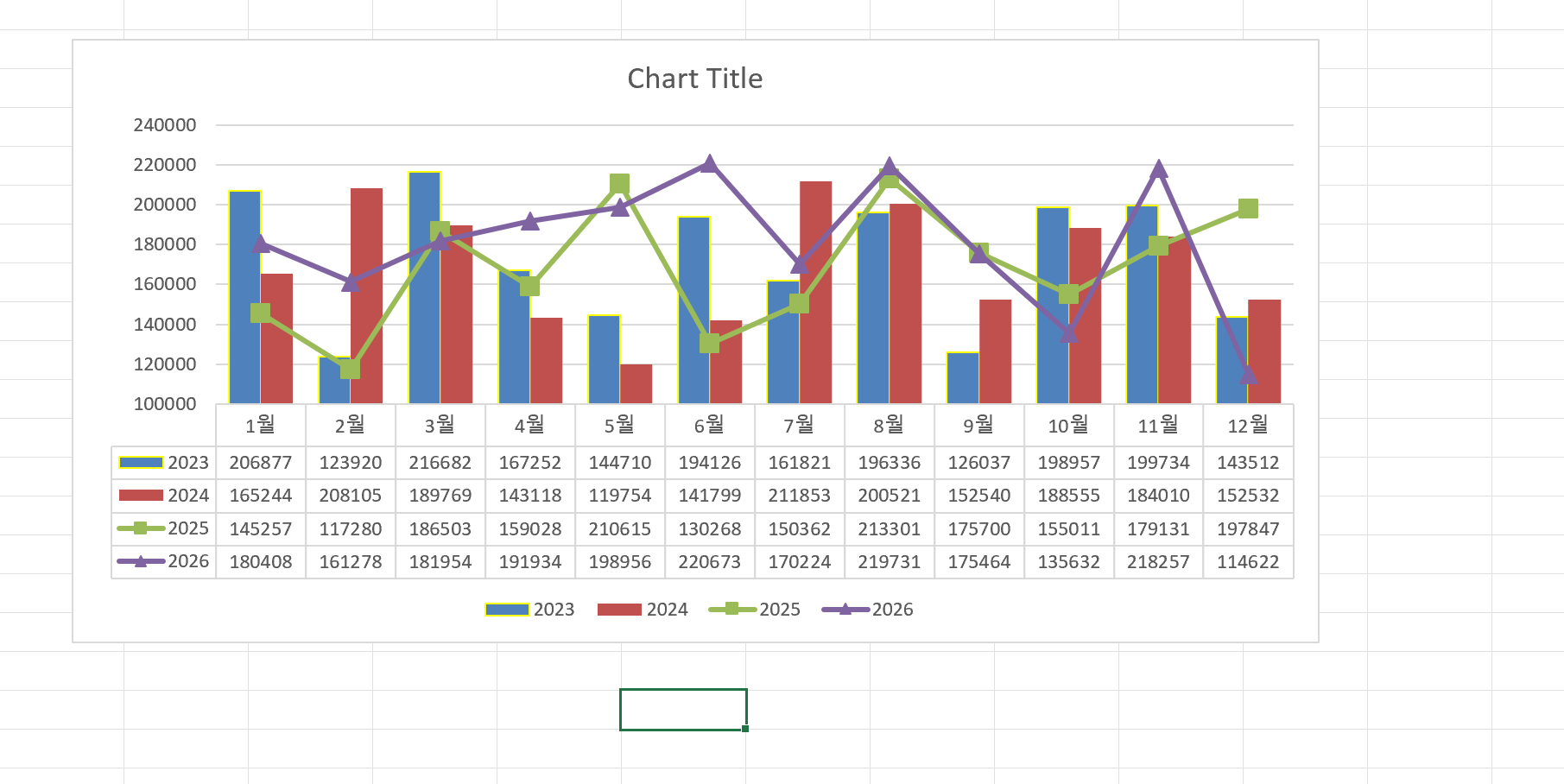
If you manage monthly production or sales data, comparing trends across years is much clearer in a chart than a table. Power Query makes this easy by reshaping your data automatically.
Start by loading your source table (Year, Month, Total) into Power Query. Keep only the Month and Total columns, then pivot by Year to get a clean structure: Month | 2023 | 2024 | 2025 | 2026. Load this to a worksheet.
Select the pivoted table and insert a combo chart — use bars for older years and a line for the current year. Optionally, enable the data table below the chart so numbers and visuals appear together.
The biggest advantage: when new data is added, just hit Refresh All and the chart updates instantly — no rebuilding required.
Power Query를 활용해 월별 데이터를 연도별 비교 차트로 만드는 방법을 정리했습니다.
생산량, 매출, 실적과 같은 데이터는 단순 표로 보는 것보다 차트로 비교하는 것이 훨씬 직관적입니다. 특히 연도별 흐름을 한눈에 확인해야 하는 경우, 데이터 구조를 차트에 맞게 정리하는 것이 중요합니다.
이번 예제에서는 Power Query를 이용해 차트에 적합한 형태로 데이터를 변환한 뒤, Excel에서 연도별 월별 생산량 비교 차트를 생성하는 과정을 정리했습니다.
원본 데이터는 연도, 월, A, B, C, D, Total 형태로 구성되어 있으며, 여기서 실제 차트에 사용할 값은 Total입니다. Power Query에서 Month를 기준으로 설정하고, Year를 열로 피벗하여 다음과 같은 구조로 변환합니다.
Month | 2023 | 2024 | 2025 | 2026
이 구조를 사용하면 Excel 차트에서 월은 가로축이 되고, 각 연도는 개별 시리즈로 표시되어 연도별 비교가 쉽게 가능합니다.
또한 Excel에서 콤보 차트를 활용하면 일부 연도는 막대 그래프로, 일부는 선 그래프로 표현하여 비교와 추세를 동시에 확인할 수 있습니다.
차트 아래에 데이터 테이블을 함께 표시하면 숫자와 그래프를 동시에 확인할 수 있어 보고서용으로도 활용하기 좋습니다.
Power Query로 데이터 구조를 만들어 두면 이후 데이터가 추가되더라도 새로고침만으로 자동 반영되기 때문에 반복 작업 없이 효율적으로 관리할 수 있습니다.
Power Query, M code, 엑셀 자동화 관련 실전 예제를 계속 공유할 예정입니다.
Download the sample file below.
You can download the zip file in [자료실][Download] page
The file name is 04.연도별 비교 차트(comparing chart).
Use the English M code provided for your dataset.
✔ Download the ready-to-use Power Query template below
✔ Just copy and paste the M code – works instantly
The original sample file is based on a Korean dataset.
You can apply the English M code to adapt it to your own data.
--------------------------------
Need a custom automation for your Excel workflow?
I can build a tailored solution based on your data.
✔ Used in real-world business automation
✔ Saves hours of manual work
minbedata@gmail.com
You can pay via PayPal.
You can also contact me via Upwork for secure payment and project handling.
<a href="https://www.upwork.com/freelancers/~01eb52dbd212cffc17" target="_blank">
Hire me on Upwork
</a>
You don't worry about conversing with me.
My Mejor is an English literature, so I can speak English fluently and read, listening, writing proficiently
korean version web address (한국버전) is
<a href="https://blog.naver.com/minbe-data" target="_blank">네이버 블로그 바로가기</a>
'Excel automation' 카테고리의 다른 글
| How to Apply Excel Cell Formatting Automatically Based on Stock Symbols with Python (0) | 2026.06.25 |
|---|---|
| Automate Excel Conditional Formatting with Python xlwings (Apply & Clear Formats) (0) | 2026.04.06 |
| 반복노동을 없애는 데이터 자동화 구조 (0) | 2026.03.10 |