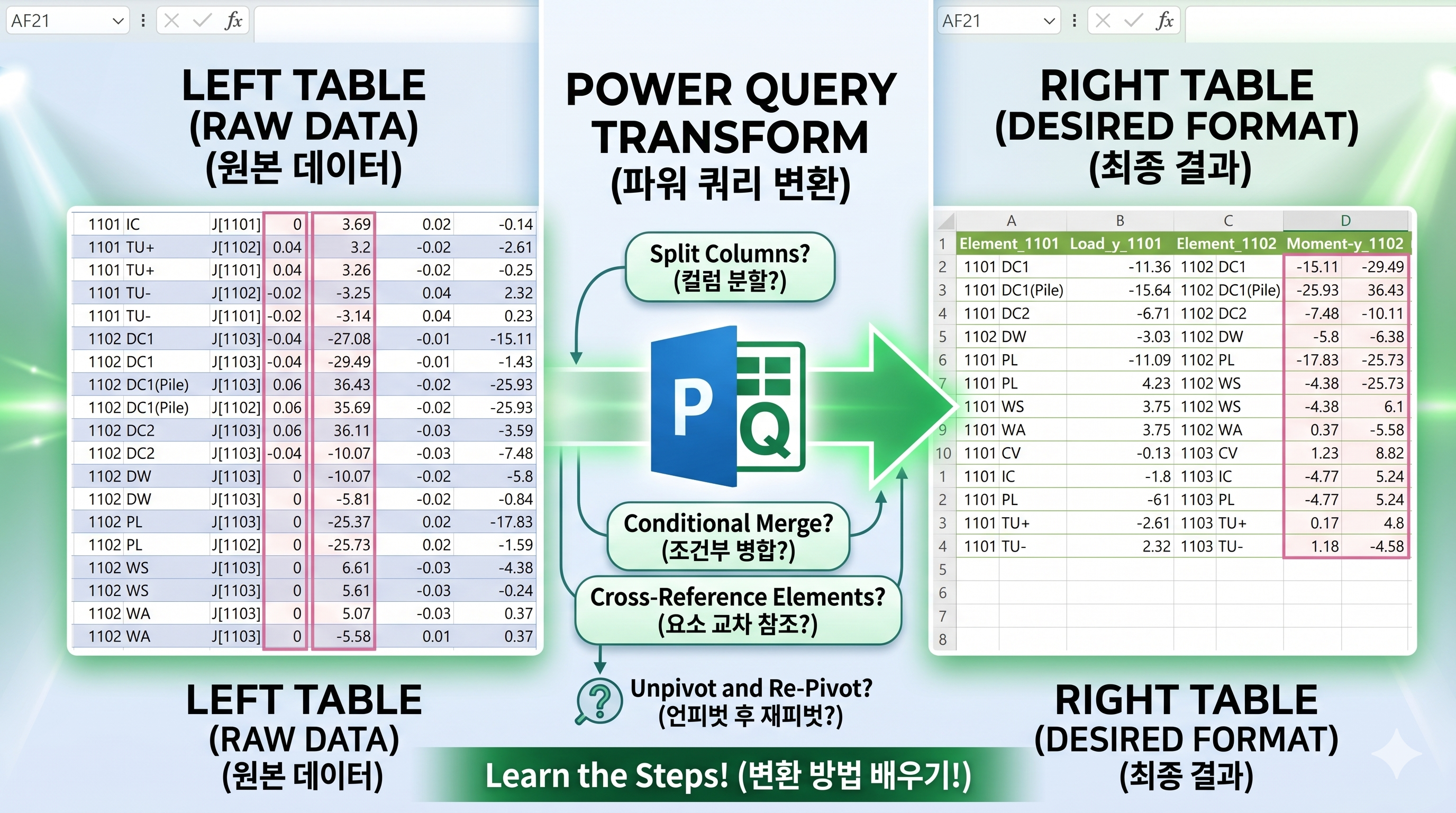
Structural analysis data is often arranged vertically, with loads listed repeatedly for each element.
This structure makes it difficult to organize the data into a clean report format.
Manually rearranging values like Moment-y and Shear-z into a horizontal layout can be time-consuming and error-prone.
In this tutorial, you will learn how to use Power Query to automatically restructure this data by element.
The result updates dynamically, even when new elements or loads are added.
구조해석 결과 데이터를 정리하다 보면
같은 Element에 대해 하중(Load)별로 값이 세로로 길게 나열되어 있어서
보고서용으로 정리하기가 번거로운 경우가 많습니다.
특히 Moment-y, Shear-z 같은 단면력 데이터를
Element별로 옆으로 펼쳐서 정리해야 할 때
수작업으로는 시간이 많이 소요되고 오류도 발생하기 쉽습니다.
이번 글에서는 Power Query를 활용하여
이러한 구조해석 데이터를 자동으로 정리하는 방법을 소개합니다.
▌문제 상황
Element + Load 기준으로 데이터가 세로로 나열됨
Moment-y, Shear-z 값이 반복 구조로 존재
보고서 형태로 정리하려면 Element별로 옆으로 펼쳐야 함
▌해결 방법
Power Query에서 다음과 같은 흐름으로 해결할 수 있습니다.
필요한 열만 선택 (Elem, Load, Moment-y, Shear-z)
하중 순서를 사용자 정의 리스트로 정렬
Element 목록을 추출하여 반복 처리
각 Element별로 행번호를 추가
열 이름에 Element 번호를 붙여 구분
List.Accumulate를 이용하여 테이블을 옆으로 병합
이 과정을 통해 Element 개수가 늘어나도
자동으로 확장되는 구조를 만들 수 있습니다.
▌결과
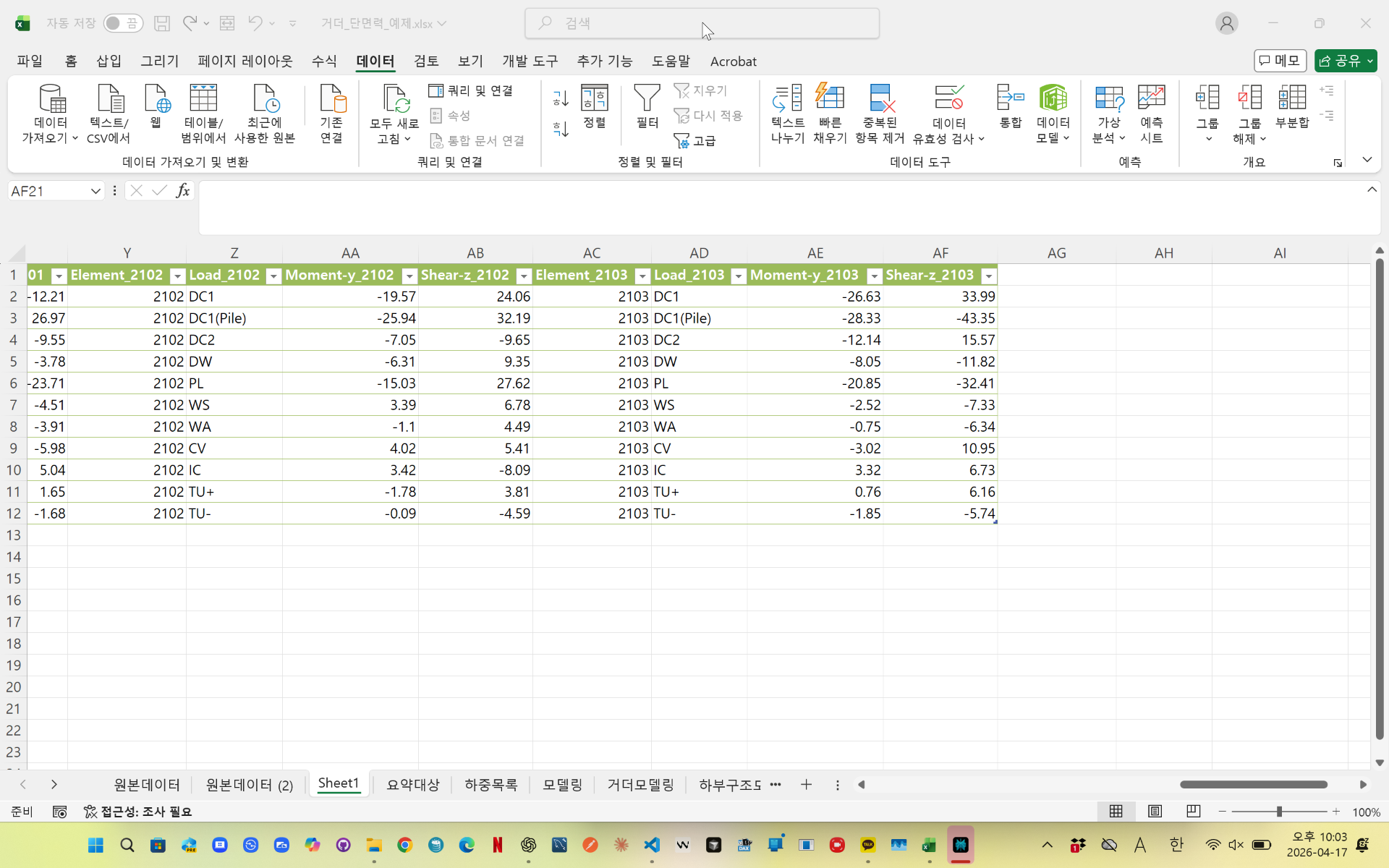
각 Element별로 하중이 동일한 순서로 정렬되며
Moment-y와 Shear-z 값이 옆으로 펼쳐진 형태로 정리됩니다.
이 구조는 보고서 작성이나 추가 분석 시 매우 효율적으로 활용할 수 있습니다.
▌핵심 포인트
하중 순서를 별도로 지정하여 정렬해야 데이터가 틀어지지 않음
행번호를 기준으로 병합해야 정확하게 맞춰짐
List.Transform + List.Accumulate 조합으로 자동화 가능
Element 개수가 변경되어도 코드 수정 없이 자동 대응
▌마무리
Power Query를 활용하면
반복적인 구조해석 데이터 정리 작업을 완전히 자동화할 수 있습니다.
특히 이번 방법은 단순 변환이 아니라
구조 자체를 재배치하는 자동화 방식이기 때문에
실무에서도 바로 활용할 수 있는 형태입니다.
videolink - https://youtu.be/sD9MEFpTGqw
Download the sample file below.
You can download the zip file in [자료실][Download] page
The file name is 40.Element별 하중 펼치기(structure analysis).
Use the English M code provided for your dataset.
✔ Download the ready-to-use Power Query template below
✔ Just copy and paste the M code – works instantly
The original sample file is based on a Korean dataset.
You can apply the English M code to adapt it to your own data.
--------------------------------
Need a custom automation for your Excel workflow?
I can build a tailored solution based on your data.
✔ Used in real-world business automation
✔ Saves hours of manual work
minbedata@gmail.com
You can pay via PayPal.
You can also contact me via Upwork for secure payment and project handling.
<a href="https://www.upwork.com/freelancers/~01eb52dbd212cffc17" target="_blank">
Hire me on Upwork
</a>
You don't worry about conversing with me.
My Major is an English literature, so I can speak English fluently and read, listening, writing proficiently
korean version web address (한국버전) is
<a href="https://blog.naver.com/minbe-data" target="_blank">네이버 블로그 바로가기</a>