
When combining multiple Excel files using Power Query, it is often difficult to identify which file each row originally came from.
This becomes more complex when identical values exist across multiple files.
In such cases, simply keeping the maximum value is not enough to track the data source.
This tutorial explains how to retain source filenames and combine them when duplicate maximum values exist.
With this approach, you can clearly trace data origins even after merging multiple files.
Power Query를 활용해 폴더 안 여러 Excel 파일을 병합한 뒤, 각 행이 어느 파일에서 왔는지 표시하는 방법을 정리했습니다.
Power Query의 폴더 병합 기능을 사용하면 여러 Excel 파일의 데이터를 빠르게 통합할 수 있습니다. 하지만 병합 후에는 특정 행이 어떤 파일에서 들어왔는지 확인하기 어려운 경우가 많습니다.
특히 다음과 같은 상황에서 문제가 자주 발생합니다.
- 여러 파일에 동일한 데이터가 존재하는 경우
- 동일한 도시와 동일한 값이 여러 파일에 존재하는 경우
- 최고값 기준으로 데이터를 정리해야 하는 경우
예를 들어 여러 Excel 파일에서 도시별 데이터를 병합했을 때, 동일한 도시와 동일한 금액이 여러 파일에 존재하면 단순히 최고값만 남겨서는 원본 파일을 확인할 수 없습니다.
이 문제는 Power Query에서 다음과 같은 구조로 해결할 수 있습니다.
1. 폴더 병합 시 파일명을 함께 추가
2. 도시별 최고값 계산
3. 최고값을 가진 행만 필터링
4. 동일한 최고값이 여러 파일에 존재하면 파일명을 합쳐서 표시
이렇게 처리하면 최종 결과에서 단순한 최고값만 보는 것이 아니라, 해당 값이 어떤 파일들에서 나왔는지까지 함께 확인할 수 있습니다.
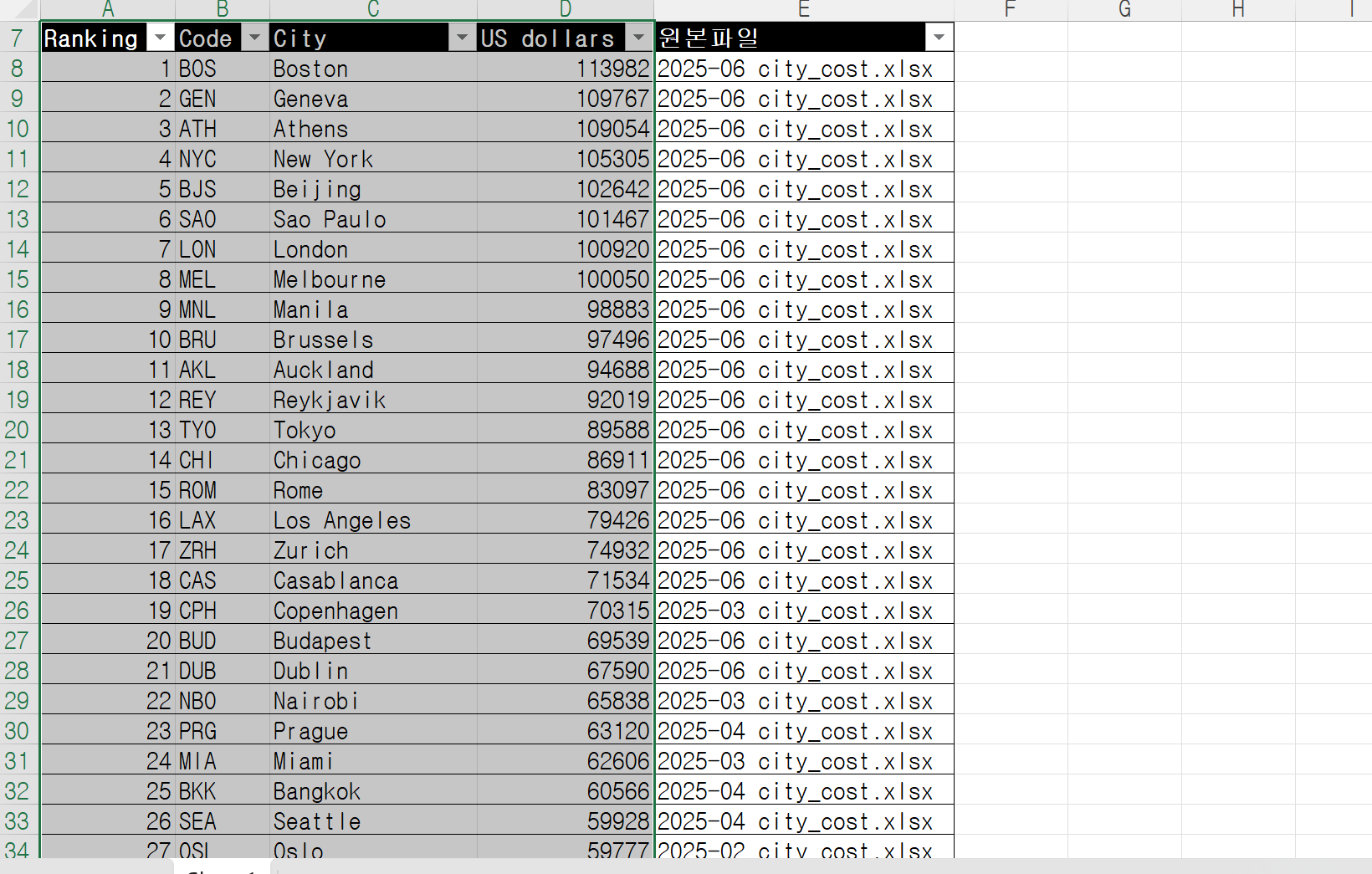
예를 들어 동일한 최고값 9500이 여러 파일에 존재하는 경우, 결과에는 다음과 같이 파일명이 함께 표시될 수 있습니다.
Ranking | Code | City | US dollars | 원본파일
1 | JP | Tokyo | 9500 | city01.xlsx, city02.xlsx
이 구조를 사용하면 폴더 병합 후에도 데이터 출처를 쉽게 추적할 수 있어 실무에서 매우 유용합니다.
Power Query, M code, 엑셀 자동화 관련 실전 예제를 계속 공유할 예정입니다.
Download the sample file below.
You can download the zip file in [자료실][Download] page
The file name is 08.파일병합-시트나타내기(file merge-sheet appear).
Use the English M code provided for your dataset.
✔ Download the ready-to-use Power Query template below
✔ Just copy and paste the M code – works instantly
The original sample file is based on a Korean dataset.
You can apply the English M code to adapt it to your own data.
--------------------------------
Need a custom automation for your Excel workflow?
I can build a tailored solution based on your data.
✔ Used in real-world business automation
✔ Saves hours of manual work
minbedata@gmail.com
You can pay via PayPal.
You can also contact me via Upwork for secure payment and project handling.
<a href="https://www.upwork.com/freelancers/~01eb52dbd212cffc17" target="_blank">
Hire me on Upwork
</a>
You don't worry about conversing with me.
My Major is an English literature, so I can speak English fluently and read, listening, writing proficiently
korean version web address (한국버전) is
<a href="https://blog.naver.com/minbe-data" target="_blank">네이버 블로그 바로가기</a>