2026/04/06 11

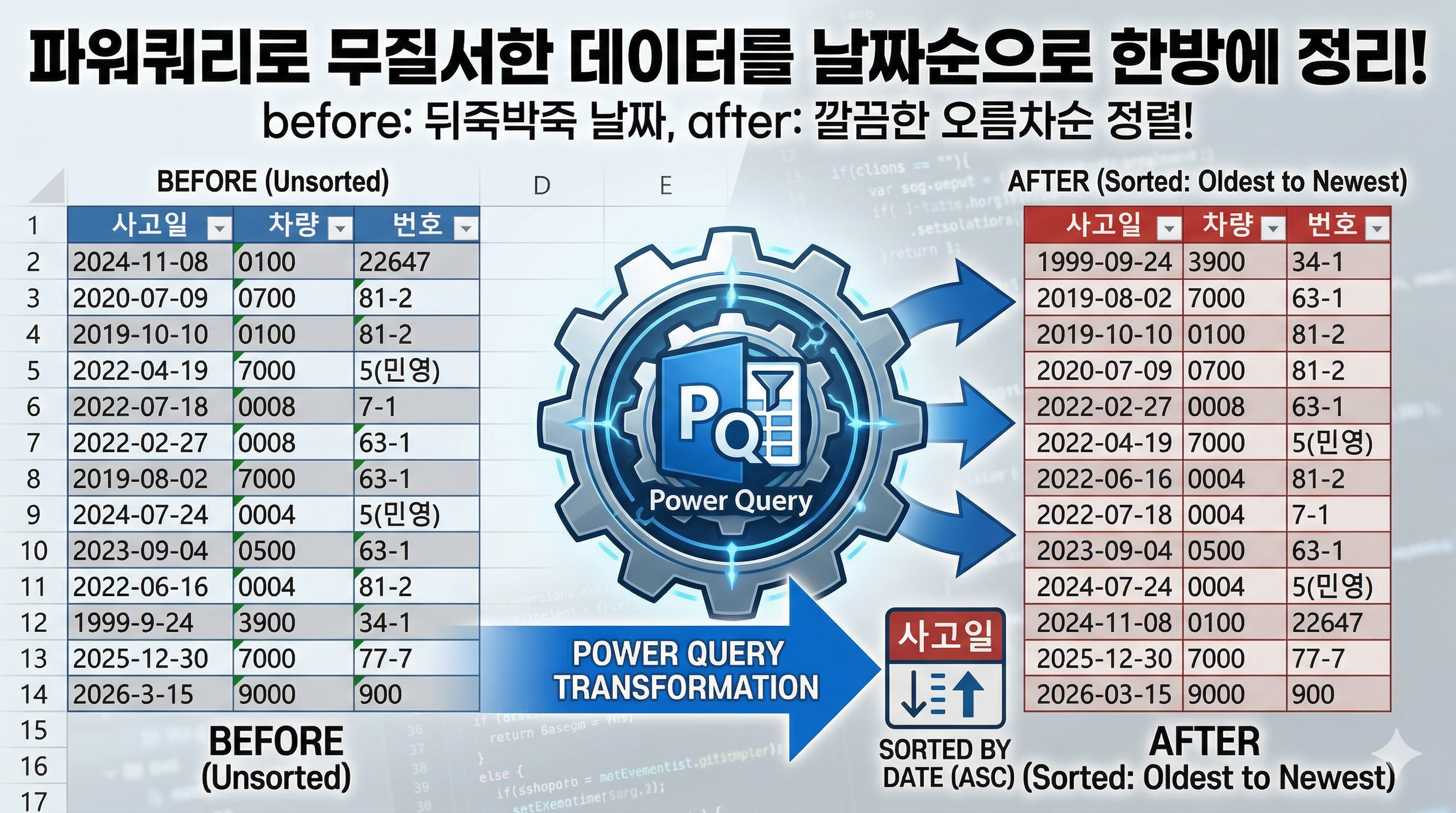
Power Query 두 컬럼 기준 중복 제거 방법 | 사고일·차량 입력용 테이블 자동 생성

Power Query를 활용해 두 개의 컬럼을 기준으로 중복 데이터를 제거하고, 입력용 테이블을 자동으로 만드는 방법을 정리했습니다. 엑셀 데이터를 정리하다 보면 사고일과 차량이 같은 중복 데이터를 제거하고, 고유한 목록만 남긴 뒤 번호를 입력할 수 있는 형태의 테이블을 만들어야 하는 경우가 있습니다. 이 작업은 엑셀 수식으로도 가능하지만, 데이터가 추가될 때마다 다시 정리해야 하는 번거로움이 있습니다. Power Query를 사용하면 이러한 과정을 자동화할 수 있습니다. 먼저 원본 데이터를 불러온 뒤, 사고일과 차량 두 컬럼을 기준으로 중복을 제거합니다. 이후 데이터를 정렬하고, 번호를 입력할 수 있도록 빈 열을 추가하여 입력용 테이블을 생성합니다. 이 구조를 만들어두면 원본 데이터가 추가되더라도 새로..

How to Count Monthly Leave Days Automatically in Excel Power Query

In Excel, employee leave dates are often stored across multiple columns such as Leave1, Leave2, Leave3, and so on. The problem is that we may need to count how many leave days each employee used in a specific month. With Power Query, this can be automated easily. In this example, the main data table is named Table1, and the target month is stored in a separate named range called TargetMonth. Pow..

Combine Multiple Tables and Calculate Totals by Code in Power Query | Table.Combine + Table.Group

When working with Excel data, it is common to have multiple tables with the same structure stored in different ranges. Manually combining and summarizing these tables can quickly become time-consuming and error-prone. In this tutorial, you will learn how to merge multiple tables into one using Power Query. Then, you will calculate totals by code using simple grouping logic. This approach automat..

Automate Excel Conditional Formatting with Python xlwings (Apply & Clear Formats)

Applying conditional formatting in Excel is useful, but managing it manually can be repetitive and time-consuming. In many testing scenarios, cell formats need to change dynamically based on data values. For example, values below a minimum or above a maximum threshold should be highlighted differently. Using Python with xlwings, you can automate both applying and removing these formats efficient..

Excel automation 2026.04.06

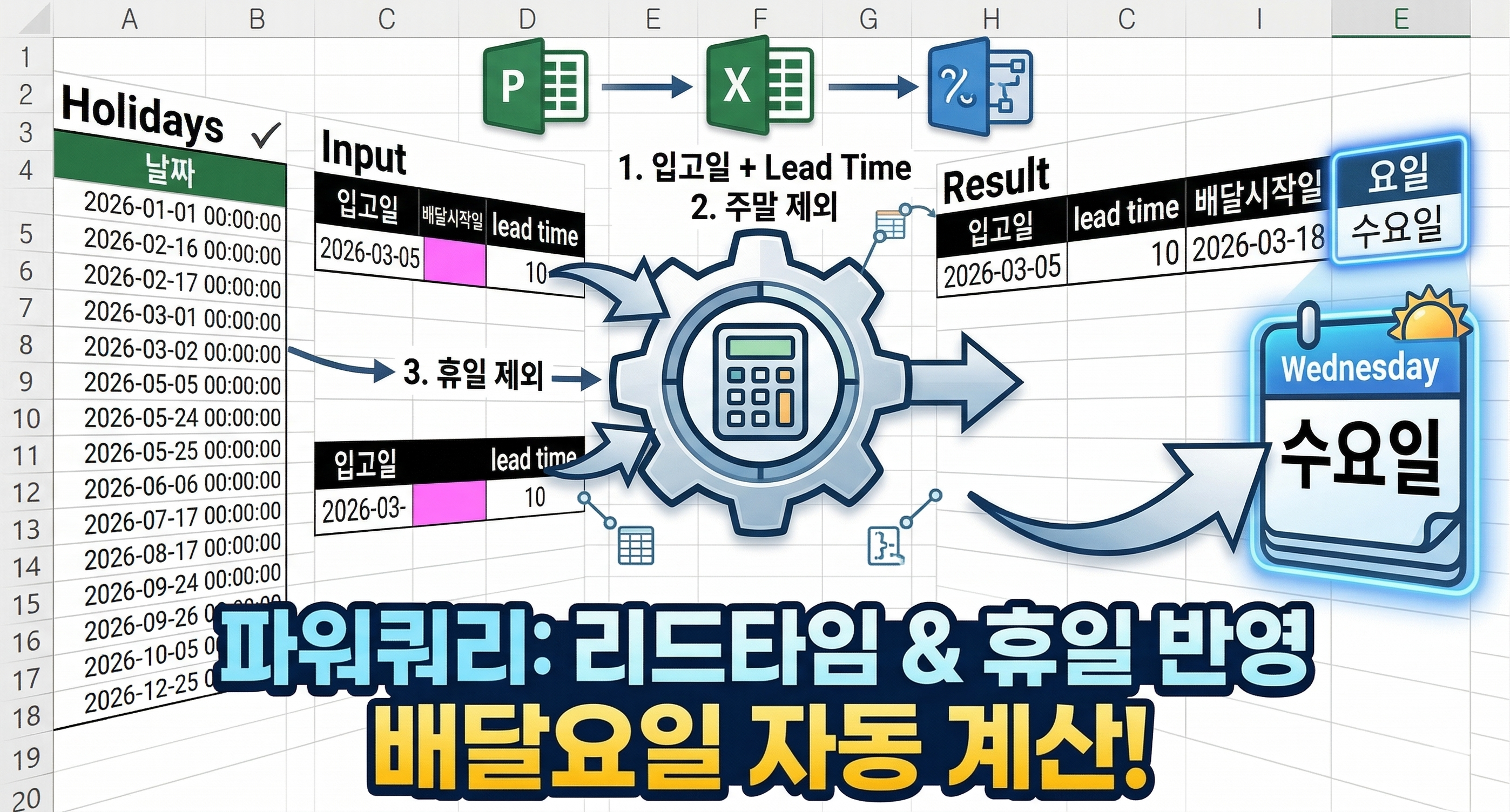
Power Query Lead Time Calculation | Exclude Weekends and Holidays Automatically

In many real-world scenarios, simply adding lead time to a date does not produce accurate results. Weekends and holidays must be excluded to calculate realistic delivery schedules. Handling this logic with Excel formulas can quickly become complex and difficult to maintain. In this example, you will learn how to use Power Query to calculate delivery start dates based on working days. The re..

How to Automatically Sum Quantities by Date Using Power Query (Group By Method)

In many Excel datasets, the same date often appears multiple times with different quantity values. Because of this, it is difficult to quickly identify the total quantity for each date. Manually calculating these totals can be time-consuming and prone to errors. In this tutorial, you will learn how to use Power Query to automatically group and sum quantities by date. Once set up, the results wil..

How to Create a Year-over-Year Monthly Production Chart Using Power Query in Excel

If you manage monthly production or sales data, comparing trends across years is much clearer in a chart than a table. Power Query makes this easy by reshaping your data automatically. Start by loading your source table (Year, Month, Total) into Power Query. Keep only the Month and Total columns, then pivot by Year to get a clean structure: Month | 2023 | 2024 | 2025 | 2026. Load this to a works..

Excel automation 2026.04.06

Power Query Insert Blank Row Automatically After Changed Rows in Excel

When working with Excel data, you may need to insert a blank row after specific rows such as "Changed" records. In many cases like construction reports or management logs, data is structured as "Original / Changed". To improve readability, a blank row is often required after each changed row. However, doing this manually takes time and needs to be repeated whenever new data is added. This exampl..

Power Query Merge Multiple Excel Files and Create City Ranking by US Dollars

When multiple Excel files share the same structure, manually opening and combining them one by one takes too much time. This example shows how to use Power Query to automatically merge multiple Excel files and generate a ranking based on US dollars. Even if new Excel files are added to the folder, the result can be updated automatically with a simple refresh. ## Process Using Power Query, the fo..